The BIG Samsung NX1 firmware update is now available!

Samsung finally released that awesome big NX1 firmware update. You can download it here: http://www.samsung.com/us/support/owners/product/EV-NX1ZZZBZBUS.


Those are the new features and fixes:

Movie mode:
Audio levels adjustable during movie capture
ISO adjustable during movie capture
23.98p and 24p frame rates for 4K UHD and 1080 video
‘Pro’ movie quality setting added for 1080 capture
Wider range of display options, including gridline, center, aspect ratio and action-safe area markers
Output time code over HDMI (for use with external recorders)
C Gamma and D Gamma curves added for movie shooting
Master black level
Luminance level limiting [0-255], [16-235], [16-255] AF speed control for smoother refocusing (3 settings)
AF responsiveness control (dictates camera’s readiness to change AF subject)
Added tools for selecting and grabbing frames from video

Physical interface changes:
Autofocus lock option in movie mode (if set to AEL button)
AF/MF toggling in movie mode (AF ON button option)
Wi-Fi and [REC] buttons’ functions can be swapped
AF On and AEL buttons’ functions can be swapped
Command dials’ direction of operation can be reversed
Add ISO or Exposure Comp. to command dial (customizable per PASM mode)
DoF Preview and Delete buttons customizable
Auto ISO options (ISO, ISO Customizing, Minimum Shutter Speed) arranged together in menus

Wireless features:
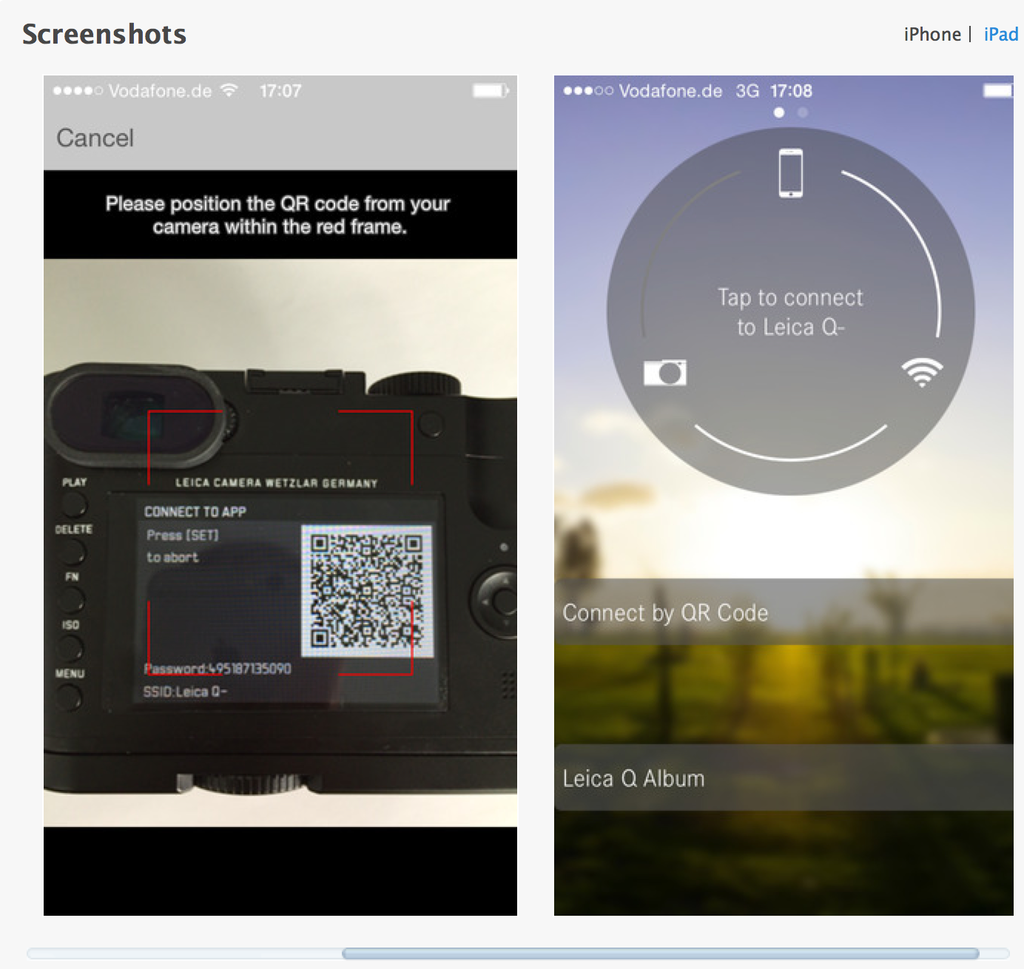
Smartphone App can operate as remote release using Bluetooth
‘Quick Transfer’ to automatically send thumbnails to a smartphone as they’re shot
Pair with multiple smart devices
Check for firmware updates over Wi-Fi

Other additions:
Trap Shot feature – fires shutter when a subject crosses a specified guideline
Samsung Remote Studio for thethered shooting from Windows PC
Samsung to release SDK for Windows to allow independent remote control software creation


Panasonic announces it’s first “selfie-ready” MFT camera: Panasonic GF7!

Oh gosh do I hate selfies :) But that’s me and the market thinks otherwise. So here is the new Panasonic GF7 which is the first selfie-ready MFT camera from Panasonic. Preorders are already up here:
Panasonic GF7 in Black at Amazon (Click here), Adorama (Click here) and BHphoto (Click here).
Panasonic GF7 in Pink at Amazon (Click here), Adorama (Click here) and BHphoto (Click here).

A long list of image samples, tests and reviews can be found at 43rumors.com

P.S.: I guess that particularly that Pink version will appeal the Female Asian market:


Next big Samsung prediction. Says “Mirrorless will outsell DSLRs ‘in three years”

Byungdeok Nam, Senior Vice President of Samsung’s R&D team has been interviewed at Dpreview. I really like what Samsung is doing on the technological front but I have to say their market prediction regarding mirrorless were always wrong in the past. So I wouldn’t trust the latest statement they made in their new interview:

I wouldn’t like to say, but since 2008 when mirrorless systems were announced, mirrorless didn’t grow very rapidly. In the last year, however, market reports are predicting that in 2018/19 mirrorless cameras will outsell DSLRs.

It’s certainly more interesting to read about the NX1 development story. To design and make the NX1 sensor they worked for three years. And the NX1 development goal was:

Full-frame, high-end DSLRs. The ones around the $5000 level. That’s our benchmark. 

They certainly did an extremely good job with the NX1!

Massive (and really impressive) new Samsung NX1 firmware update coming soon!

In mid January Samsung will release a new NX1 firmware update and add the following many features and fixes:

Movie Mode Refinements
•Users can now adjust audio levels while recording video.
•Users can now control ISO while recording video.
•23.98 and 24 frame per second rates now available for UHD & FHD.
•Pro Quality mode added to Full HD. Previously only HQ and Normal were provided for FHD.
•?Display marker enhancements: •?Gridlines and center marker overlays in movie mode are now visible.
•Added 4:3 and 2.35:1 aspect ratio markers.

•Added Action-safe area marker option.
•?The Samsung NX1 now supports Time Code through HDMI for use when using an external recorder such as the ATOMOS Shogun.
•?‘Free Run’ time code supported.
•Time Code not supported for internal recording.
•Two Gamma modes now provided for more control of aesthetic look of footage. Both gamma modes are designed for a more cinematic look. •?C Gamma mode is a preset logarithmic color setting designed to deliver higher overall contrast.
•D Gamma is a preset logarithmic color setting designed to capture a wider tonal range for increased dynamic range.

•Master Black Level Control: •?Users can now control dark level gamma.
•31 levels: -15 ? +15.

•Three luminance level options are now provided: •[0-255], [16-235], [16-255].

•AF speed control implemented for more cinematic autofocus control: •User can now select one of three AF speeds.

•Added AF responsiveness control: •This is a new AF feature for controlling continuous AF behavior when tracking focus on a moving subject.
•User can select from five different speeds to control how quick the camera will refocus and begin tracking a new subject if something comes in-between the camera and the original subject being tracked.

•Added control for seeking specific frame to grab from video. •Users can select by individual frame in the forward direction.
•If seeking in the backward direction frames within a half-second are selectable.

Physical User Interface
•Added Autofocus Lock (AFL) to movie mode. Users can now set the AEL button to lock focus in Movie mode.
•?Auto Focus/ Manual Focus Toggling to movie mode. ?Users can now set the AF ON button to toggle between auto focus and manual focus during recording.
•?Customizable physical user interface refinements: •?Reverse the functions of the Mobile Button and the Record button.
•Reverse the functions of the AF On button and the AEL button.
•Reverse the direction of the Command dials based on preference.
•Additional customization options to the functions of the command dials when in P/A/S/M.
•Customize the Optical Preview and Delete buttons with a different function.

Wireless
•Bluetooth Remote – Can now use Bluetooth as simple remote trigger. Speeds up and simplifies using a smart device as remote control.
•?The Samsung Camera Manager App now provides the ability to trigger the shutter release / video start/stop from a smart device using Bluetooth as opposed to Wi-Fi
•User can choose ‘Quick transfer’ which will send a QVGA still to the smartphone after it’s taken
•?The Samsung NX1 can now store multiple paired Smart devices. If a user has multiple smart devices, they only need to register them with the camera once to store them. For example, users do not have to re-register devices when shifting from a phone to a tablet.
•?Added wireless firmware updating: •?When connected to a Wi-Fi network, the camera will notify users if a new firmware version is available, and will allow them to download and install the update wirelessly.

Other
•“Trap Shot” feature added to Samsung Auto Shot mode. Allows users to adjust the guide line so that when a moving object hits it, the camera will automatically take a picture.
•?PC tethering implemented: •?Using Samsung Remote Studio software, the Samsung NX1 now supports tethered shooting via USB Windows PC only.

•Samsung Remote Studio Software will be available via Samsung iLauncher.
•?Software Development Kit (SDK) for Windows PC: •?Samsung will provide an SDK for Windows allowing developers to make remote access and control software for the Samsung NX1.


found via Imaging Resource.